
Why Online Video Editing Keeps Growing
Video has become the default format for communication on the internet. Tutorials, short-form entertainment, marketing clips, school projects, and even internal company updates now rely on video instead of text. As this shift continues, more people search for ways to edit videos online without installing complex software.
Not everyone needs professional tools with hundreds of features. Many users want something faster:
- Trim a clip
- Resize it for Instagram or TikTok
- Add subtitles
- Compress a large file for email or cloud sharing
This is where browser-based video editors quietly gained popularity. They remove the technical barrier while still delivering polished results.
What People Actually Search for When Editing Videos
Keyword trends around video editing tend to be task-based, not brand-based. People usually type queries like:
- “how to cut video online”
- “resize video for Instagram”
- “compress mp4 without losing quality”
- “add subtitles to video automatically”
- “merge videos online free”
These searches reflect real problems. Users already have a video; they just need to fix or adapt it. Content that addresses these micro-tasks clearly and efficiently tends to perform well in organic search.
Common Video Editing Tasks (and How to Handle Them Online)
Most casual and semi-professional video edits fall into a few repeatable categories.
- Trimming and Cutting
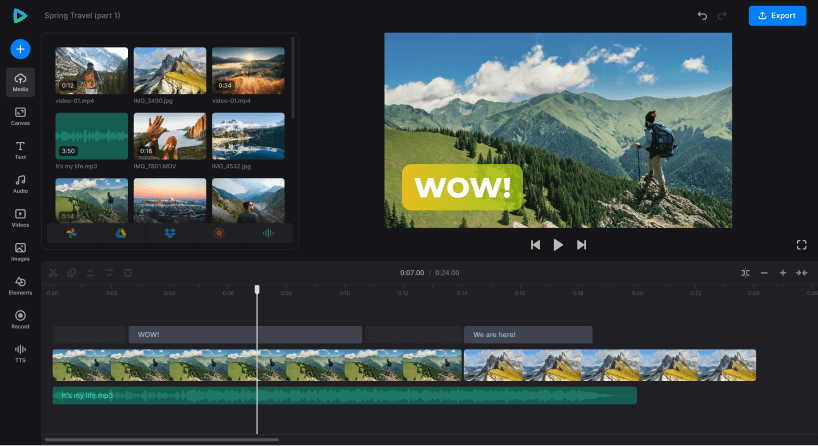
Removing awkward pauses or unnecessary sections is the most common edit. Online editors allow you to visually drag cut points without learning timelines or layers.
- Resizing and Cropping
Different platforms demand different formats:
- YouTube: 16:9
- TikTok & Reels: 9:16
- Instagram feed: 1:1 or 4:5
A good online editor includes preset aspect ratios so users don’t have to calculate dimensions manually.
- Adding Subtitles
Subtitles improve accessibility and engagement. Many people watch videos on mute, especially on social platforms. Some online editors generate subtitles automatically and allow manual corrections.
- Compressing Large Files
High-quality video files can be massive. Compression tools help reduce file size while keeping acceptable visual quality, which is especially useful for uploads and sharing.
- Converting Formats
MP4, MOV, AVI, WEBM—different devices and platforms support different formats. Conversion is another frequent reason users look for web-based tools.
Browser-Based Editors vs Desktop Software
Desktop editors like Adobe Premiere Pro or Final Cut Pro are powerful, but they’re not always practical.
| Feature | Online Editors | Desktop Software |
| Installation | None | Required |
| Learning curve | Low | High |
| Device flexibility | Any browser | Usually one machine |
| Cost | Often freemium | Subscription or license |
| Speed for small tasks | Very fast | Overkill |
For quick edits, browser tools are simply more efficient. This explains why many creators, marketers, and educators keep at least one online editor bookmarked.
One example frequently mentioned in user communities is Visit Clideo, a web-based platform that focuses on single-purpose video tools rather than overwhelming interfaces. Users can trim, resize, subtitle, compress, or convert videos directly in the browser, which aligns well with common search intent.
Step-by-Step Workflow for Editing Videos Online
A simple workflow keeps editing stress-free:
- Upload your file
Most online editors support direct uploads from your device or cloud storage. - Choose a specific task
Instead of opening a complex editor, select exactly what you need—cutting, resizing, or adding text. - Preview changes in real time
Visual feedback prevents mistakes and speeds up decision-making. - Export with the right settings
Choose resolution, format, and compression level based on where the video will be published.
This task-based workflow mirrors how people actually work, which is why focused online tools continue to grow.
Video Optimization for Social Media Platforms
Editing doesn’t end with visuals. Optimization matters.
Platform-Specific Tips
- TikTok & Reels: Vertical format, short duration, subtitles recommended
- YouTube: Horizontal format, higher resolution, clean audio
- Facebook: Square or vertical, captions for silent autoplay
Exporting videos in the correct format reduces platform compression and improves visual quality.
File Size and Load Time
Large files load slowly and may be downgraded by platforms. Compression tools help balance clarity and performance.
For reference on how video formats work at a technical level, Wikipedia’s overview of video compression is a useful background resource:
Mobile Video Editing: When Apps Matter
While browsers handle most tasks well, mobile apps are useful when editing on the go. Some users prefer making quick edits directly on their phones, especially for short-form content.
Clideo also offers a dedicated iOS app for mobile workflows, which can be useful when:
- Editing videos recorded on an iPhone
- Uploading directly to social platforms
- Making last-minute changes while traveling
Having both browser and app options gives users flexibility depending on context.
Security, Privacy, and File Handling
One concern that often appears in search queries is safety: “Is online video editing secure?”
Reputable platforms address this by:
- Using encrypted connections (HTTPS)
- Automatically deleting files after processing
- Avoiding unnecessary data retention
Before uploading personal or work-related content, users should always check privacy policies and file retention terms.
Useful Resources for Learning Video Editing
Even simple tools benefit from a bit of background knowledge. These external resources help users understand best practices:
- Wikipedia – Video Editing
A solid overview of concepts and terminology. - YouTube Creator Blog
Practical insights into how video content performs on major platforms.
These references complement hands-on tools by explaining why certain edits work better than others.
Final Thoughts
Online video editing is no longer a compromise—it’s often the most efficient option. For everyday tasks like trimming, resizing, subtitling, or compressing videos, browser-based solutions remove friction and save time.
The key is choosing tools that match real user intent rather than forcing complex workflows. Platforms such as Visit Clideo fit naturally into this space by focusing on clarity, speed, and accessibility instead of overwhelming feature sets.
As video continues to dominate communication across platforms, knowing how to edit and optimize content quickly will remain a valuable skill—whether you’re a creator, educator, marketer, or just someone sharing moments online.